What is a CMS? Content Management Systems Explained Simply
When you start talking to web designers about building a website, one acronym comes up constantly: CMS. But what is a CMS, and why does it matter so much? If no one has taken the time to explain it properly, it is easy to nod along without really understanding what you are agreeing to. At JWD Website Design, we believe an informed client is a happy client. So let us break down what is a CMS, why you almost certainly need one, and how it affects every aspect of your business website.
What is a CMS in Plain English?
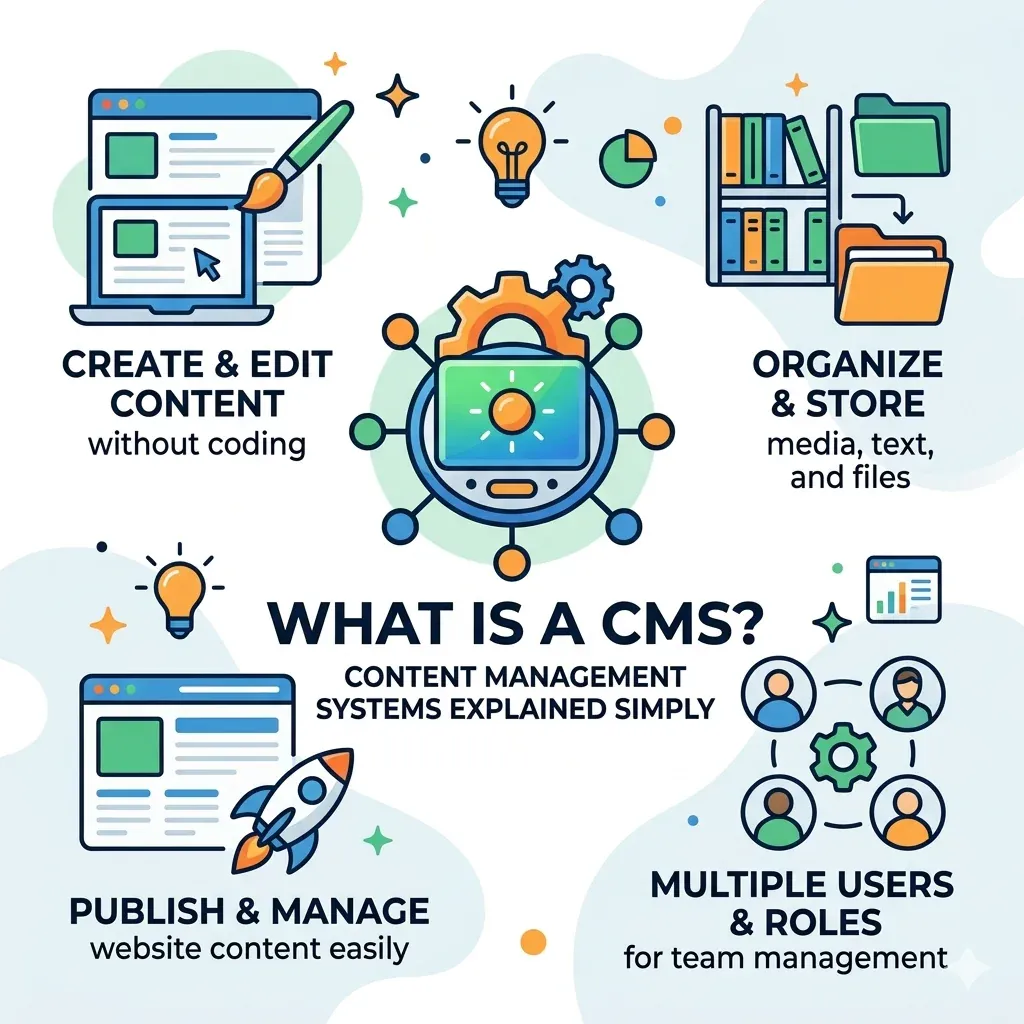
What is a CMS? CMS stands for Content Management System. In the simplest possible terms, a CMS is software that allows you to create, edit, organise, and publish content on a website without needing to know how to write code.
Before CMS platforms existed, every change to a website required a developer to manually edit the HTML and CSS files behind the scenes. You wanted to change your phone number on your contact page? That was a job for a developer. You wanted to publish a new blog post? Another technical task.
What is a CMS solving? That exact problem. With a CMS, you log in to a dashboard, make your changes in what looks like a word processor, and click publish. The software handles everything else in the background.
What is a CMS also doing beyond just editing content? It manages your entire website structure: pages, posts, media files, menus, user accounts, design templates, and settings. It is the operating system of your website.
What is a CMS Used For?
- Publishing and editing web pages: Creating new pages, editing existing ones, and removing outdated content without touching any code. You manage your entire website from one simple interface.
- Running a blog or news section: A CMS organises your articles, lets you assign categories and tags, schedules posts to publish at set times, and displays them in the right order automatically.
- Managing media: What is a CMS handling when you upload photos or videos? It stores them in an organised library, lets you resize and crop images, and inserts them into your pages wherever you need them.
- Handling user accounts: If you have a team, a CMS lets you give each person their own login with appropriate permissions. An editor can write and publish articles; a contributor can only draft content for approval.
- Running eCommerce: What is a CMS powering when you have an online store? The product listings, the shopping cart, the checkout, and the order management system all operate through the CMS. If you are selling online, our e-commerce website packages are built on exactly this foundation.
- SEO management: Modern CMS platforms integrate with SEO tools that let you set your page titles, meta descriptions, and keywords directly from the same dashboard where you manage your content.
The Most Popular CMS Platforms
| Platform | What it is best at | Watch out for |
|---|---|---|
| WordPress | Powers a large share of the web. Powerful, flexible, free, with a massive global community. What JWD builds on for almost every client site | Needs maintenance, because you own it |
| Shopify | Selling products quickly on a hosted platform built for online stores | Less design flexibility and ongoing platform fees |
| Wix | Simple personal sites and small hobby projects | Not recommended for a business site that needs to rank |
| Squarespace | Beautiful templates, quickly | Weaker on SEO, plugins and long-term scalability |
WordPress
By far the most popular CMS in the world. WordPress is what is a CMS done right: powerful, flexible, free, and backed by a massive global community. JWD Website Design uses WordPress for almost every client website we build, from our 3-5 page website packages to full online stores. Read our full guide to what is WordPress for a detailed overview.
Shopify
A hosted eCommerce CMS aimed specifically at online stores. Good at selling products quickly, but with less design flexibility and ongoing platform fees.
Wix
A beginner-friendly website builder. Suitable for simple personal websites or small hobby projects. Not recommended for serious business websites that need to rank on Google.
Squarespace
A design-focused hosted CMS. Good at beautiful templates quickly, but less capable on SEO, plugin flexibility, and long-term scalability.
For South African businesses, WordPress is almost always the right answer. It handles SEO well, it is flexible, and it has a very large ecosystem of developers and tools.
What is a CMS vs a Website Builder?
A traditional website builder is a closed system. The hosting, the design tools, and the templates are all part of one package, and you cannot take your website elsewhere. What is a CMS like WordPress different in this regard? Completely different. WordPress is open software that you install on your own hosting. You own the files, you own the data, and you can move your website to any host in the world.
Website builders are designed for speed and simplicity at the cost of flexibility and ownership. What is a CMS offering instead? Power and control. For a business that wants to grow online, a proper CMS almost always serves you better in the long run. Pairing WordPress with fast local hosting gives you the best of both: full ownership and quick load times for your South African visitors.
What is a CMS Doing for Your SEO?
One of the most important reasons to use a proper CMS is the impact on your Google rankings. A well-configured CMS like WordPress gives you control over every SEO factor on your website. Through a plugin like Rank Math (which JWD Website Design uses on all client sites), you can set a unique meta title and meta description for every page, create an XML sitemap automatically, add schema markup to your content, optimise your images with alt text, and monitor your keyword usage.
Without a CMS, these tasks require manual code editing. With a good CMS, they are handled through a simple interface by anyone on your team. Read our guide to WordPress on-page SEO to see exactly what this looks like in practice. If your site is built but not ranking, our SEO Rescue service can get your CMS configured correctly.
What is a CMS Doing for Website Maintenance?
What is a CMS also making much easier? Website maintenance. Your CMS receives regular updates that fix bugs, patch security vulnerabilities, and add new features. In WordPress, you can apply these updates with a single click.
JWD Website Design offers website maintenance packages for South African businesses that handle all of this for you if you prefer not to manage it yourself. Keeping your CMS updated is one of the most important things you can do to protect your site from security threats.
What Does a CMS Give Your Business Long-Term?
- Independence: You are not dependent on a developer for every small change. A CMS enables self-sufficiency.
- Scalability: As your business grows, a CMS lets you add new pages, products, blog posts, and features without rebuilding anything from scratch.
- Consistency: Every page of your site uses the same design template, the same navigation, and the same branding automatically.
- Security: A reputable CMS receives regular security updates, protecting you from the majority of web vulnerabilities that target unpatched software.
- Cost efficiency: After the initial build, a CMS lets you manage all of your own content without paying a developer for routine updates.
Choosing the Right CMS for Your South African Business
The right CMS for your business depends on your needs, your budget, and your plans for growth. WordPress is free to use, the most widely supported platform in the world, and the lowest-cost way to get a site you can edit yourself. A custom CMS, built only for your business, gives you the same control without the plugin stack, and is the best long-term fit for most growing businesses. Our comparison of static website vs WordPress vs custom CMS sets out when each one makes sense.
If you are ready to build a website on a proper CMS, explore our business website packages for South African businesses or take a look at our website planning guide to help you think through what your site needs. You can also follow JWD Website Design on Facebook to see our latest projects.
Not sure which CMS or package is right for you? Request a free quote and the JWD Website Design team will help you choose the perfect setup for your business.
Frequently Asked Questions
What is a CMS in simple terms?
CMS stands for Content Management System. It is software that lets you create, edit, organise, and publish content on a website without needing to know how to write code. You log in to a dashboard, make your changes in what looks like a word processor, and click publish. Beyond editing, it manages your whole site structure: pages, posts, media, menus, user accounts, design templates, and settings.
Which CMS is best for a South African business?
It depends on how you will use the site. WordPress is the lowest-cost way to get a site you can edit yourself and has the largest ecosystem of plugins and developers. A custom CMS gives you your own admin area without third-party plugins to maintain or licences to renew, which makes it the best long-term fit for most growing businesses. If your content rarely changes, a static website is faster and cheaper still.
What is the difference between a CMS and a website builder?
A website builder is a closed system where the hosting, design tools, and templates are bundled together, and you cannot move your site elsewhere. A CMS like WordPress is open software you install on your own hosting, so you own the files and data and can move to any host. Builders favour speed and simplicity, while a CMS gives you power, control, and ownership.
How does a CMS help with SEO?
A well-configured CMS like WordPress gives you control over every on-page SEO factor. Through a plugin like Rank Math, which JWD uses on all client sites, you can set a unique meta title and meta description for every page, create an XML sitemap automatically, add schema markup, optimise images with alt text, and monitor keyword usage, all from a simple interface instead of editing code manually.
Why does a CMS make website maintenance easier?
Your CMS receives regular updates that fix bugs, patch security vulnerabilities, and add new features, and in WordPress you can apply them with a single click. Keeping your CMS updated is one of the most important things you can do to protect your site. JWD Website Design also offers website maintenance packages for South African businesses if you prefer not to manage it yourself.