Icon Technical: A Security Installer Website Case Study
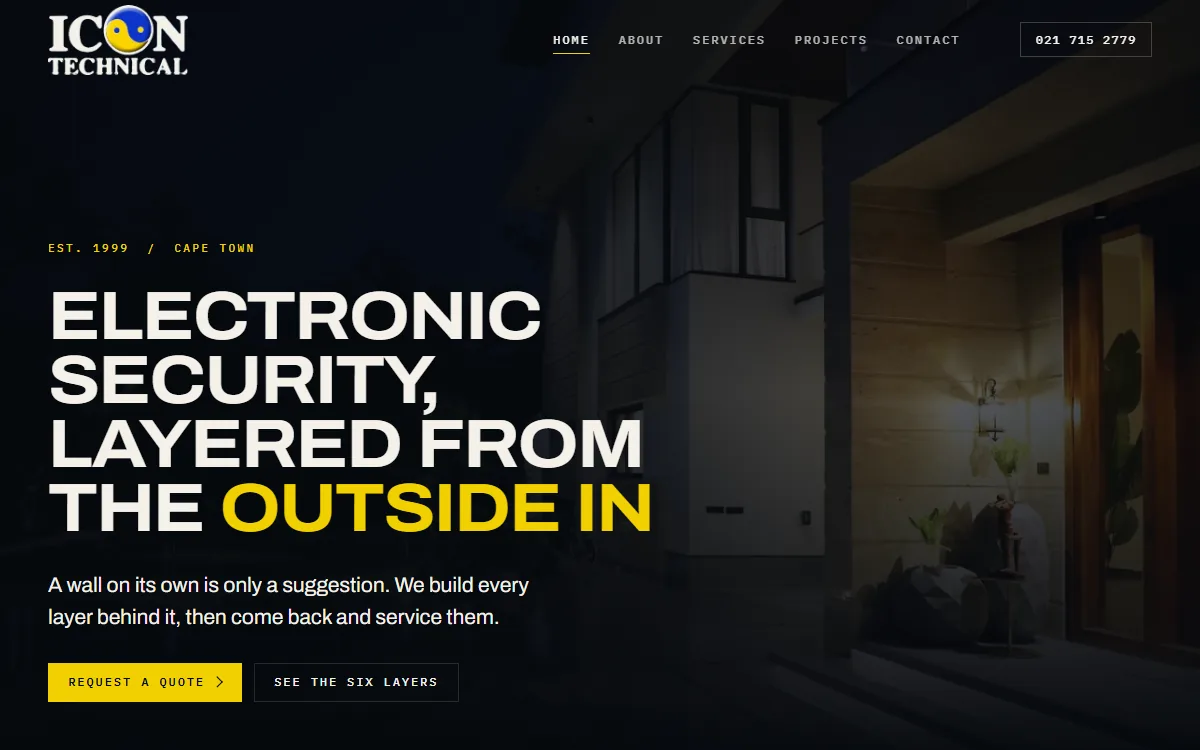
Icon Technical is a Cape Town electronic security installer, established in 1999 by Roland Parenzee and still run by him. The company installs and services electric fencing, outdoor beams, gate and garage motors, intercoms, intruder alarms and CCTV for homes and businesses across the city. Its own line sums up the approach: a technician, not a call centre.
Until September 2026 the company’s website was the one built for it in 2011. The new site went live at icontechnical.co.za on 22 September 2026.
The problem with most security websites
Most security installer websites say the same thing in the same order: a stock photo of a camera, a list of services, and a phone number. A homeowner comparing three installers cannot tell them apart, and nothing on the page explains how the pieces of a security system fit together.
Icon Technical had a better story than that, and it was already in the way the business works. Security is fitted in layers, from the outside in, and each layer does a different job. So we built the whole site around that idea.
Six layers, from the boundary to the lounge
The home page is built around one line drawing of a property. As a visitor scrolls, the drawing lights up one layer at a time, in the order an intruder would meet them:
- Perimeter: electric fencing, energizers and wall-top detection.
- Outdoor detection: beams and sensors that cover the open ground between the wall and the house.
- Access and automation: gate motors, garage motors, keypads and readers.
- Entry and intercom: audio and video intercoms at the gate and the door.
- Intruder alarm: alarm systems, interior detectors, panic buttons and fire detection.
- Surveillance: CCTV and remote viewing over all of it.
Each layer stays lit as the next one arrives, so by the end the visitor has seen a complete system assemble itself. At layer four, the threshold, the page switches from a dark palette to a light one: this is where outside becomes inside. A list of layer names beside the drawing shows where the visitor is.
The same six layers run through the Services page, in the same order, so a visitor who arrives there first gets the same explanation. The Services page closes on a plain question, “Which layer are you missing?”, which is exactly the conversation a security installer wants to start.
It still works without the animation. With JavaScript switched off, the sequence stops pinning and all six layers read as a plain stacked list, with no content duplicated to achieve it. We checked this on the live site.
Real products, used with permission
A security buyer’s real question is “what will you actually fit?”. So each layer on the Services page shows a real product rather than a stock photo, drawn from the brands Icon Technical lists as the ones it installs: an Optex outdoor beam, a Centurion gate motor, a Hikvision villa door station, an Ajax alarm kit and a Hikvision turret camera.
Icon Technical is a recognised installer of products from RSEC, the security equipment distributor, so the product photographs come from RSEC’s catalogue and are used with RSEC’s permission. RSEC is also a JWD client. Each image was cut out of its white catalogue background so it sits cleanly on the page, and each one’s alt text names the exact product in the frame, so the claim can be checked.
Honest photography
Icon Technical’s own installation photographs are real but small, most of them 320 pixels wide. We used them at close to their original size as proof of work, and never stretched them into large, blurry banners.
Where the design needed large, atmospheric images, we used licensed stock photography, and none of it is captioned or presented as an Icon Technical installation. When Roland asked for the old team photo to be replaced with a general picture of technicians at work, we chose one where nobody is identifiable and there is no branding, and rewrote the alt text so it no longer described the people as Icon Technical staff.
The brand, kept and sharpened
The site uses Icon Technical’s actual logo file, not a redrawing. The brand’s blue and gold were sampled from the logo itself rather than chosen by eye. The logo’s lettering was dark, which disappears on a dark background, so we made a second version with light lettering and left the blue and gold mark untouched.
Roland reviewed the site over a weekend and sent his feedback as WhatsApp voice notes. His most important point was that the logo in the top corner was too small, so it now fills the header bar, at rest and when the header shrinks on scroll.
Two typefaces are used across the whole site, both hosted on the site itself rather than loaded from a third party.
Replacing a 2011 site without losing its history
The old site had been at the same addresses for years, and those addresses may be bookmarked, linked from elsewhere or remembered by search engines. So every old page address now permanently redirects to its new equivalent: the old home, about, services, contact and both gallery pages. We tested all six redirects on the live domain.
The old site itself was not deleted. It is archived on the server, outside the public website, so nothing from the previous build is lost.
Built as a custom static site
Icon Technical does not need to edit its pages every week, so the site is built as a fast custom static site with no content management system, no database and no plugins to update. The business details, such as the phone numbers and email address, live in one settings file, so changing a number updates the header, the footer, the contact page and the search engine data at once.
That fits the brief, and it is fast. Measured on Google PageSpeed Insights on the day this case study was written, the home page scores 99 for performance, 94 for accessibility, 100 for best practices and 100 for SEO on mobile, with the same four scores on desktop. The mobile page shows its main content in 1.1 seconds, with no layout shift. Our guide to static website vs WordPress vs custom CMS explains when a static build is the right choice.
The search groundwork
- Local business structured data on every page, marking Icon Technical as a security system installation service in Cape Town, with breadcrumbs on the inner pages.
- Page titles written for what people search for: “Electronic Security, CCTV and Alarms, Cape Town” on the home page, and each service named on the Services page.
- One main heading per page, real page landmarks, and alt text on every image.
- A sitemap and robots file in place from launch.
- A contact form protected against spam bots with a hidden field, a timing check and a limit on repeated submissions, all without making real visitors solve a puzzle.
The result
Icon Technical replaced a 2011 website with one that explains its trade better than a list of services could. The six-layer sequence gives a homeowner a way to think about their whole property, and ends with the question that starts a quote: which layer are you missing?
You can visit the live site, or see more of our work on the portfolio. For more on what a security business needs from its website, read our guide to website design for security companies.
Considering something similar?
If your business has a clear way of explaining what it does, the website should be built around it rather than squeezed into a template. Our custom static website packages start small and stay fast, and larger or more involved builds are quoted per project. Request a quote and tell us what the site needs to do.
Frequently Asked Questions
What should a security installer’s website show?
What you install and how it fits together. A buyer wants to know which products you fit, how the parts of a system work together, and how to reach a technician. Real products, named precisely, and real installation photos do more for trust than generic stock images of cameras.
Is it acceptable to use a supplier’s product photos on an installer’s website?
Only with the supplier’s permission. Icon Technical is a recognised installer of RSEC products, and its site uses product images from RSEC’s catalogue with RSEC’s permission, and each image’s alt text names the exact product, so the claim stays accurate.
What happens to the old pages when a website is replaced?
They should redirect permanently to their new equivalents, so bookmarks, links from other sites and search engine listings keep working. On Icon Technical’s site all six old page addresses redirect, and each was tested on the live domain after launch.
Does a scroll animation hurt a website’s speed or accessibility?
It does not have to. Icon Technical’s six-layer sequence scores 99 for performance on mobile, and with JavaScript switched off the same content reads as a plain list, so nothing is lost for visitors or search engines that do not run the animation. For a full-screen WebGL example, see how we kept the gunner’s-sight intro on To The Point International fast.