RobsLostWhat: A Website Case Study
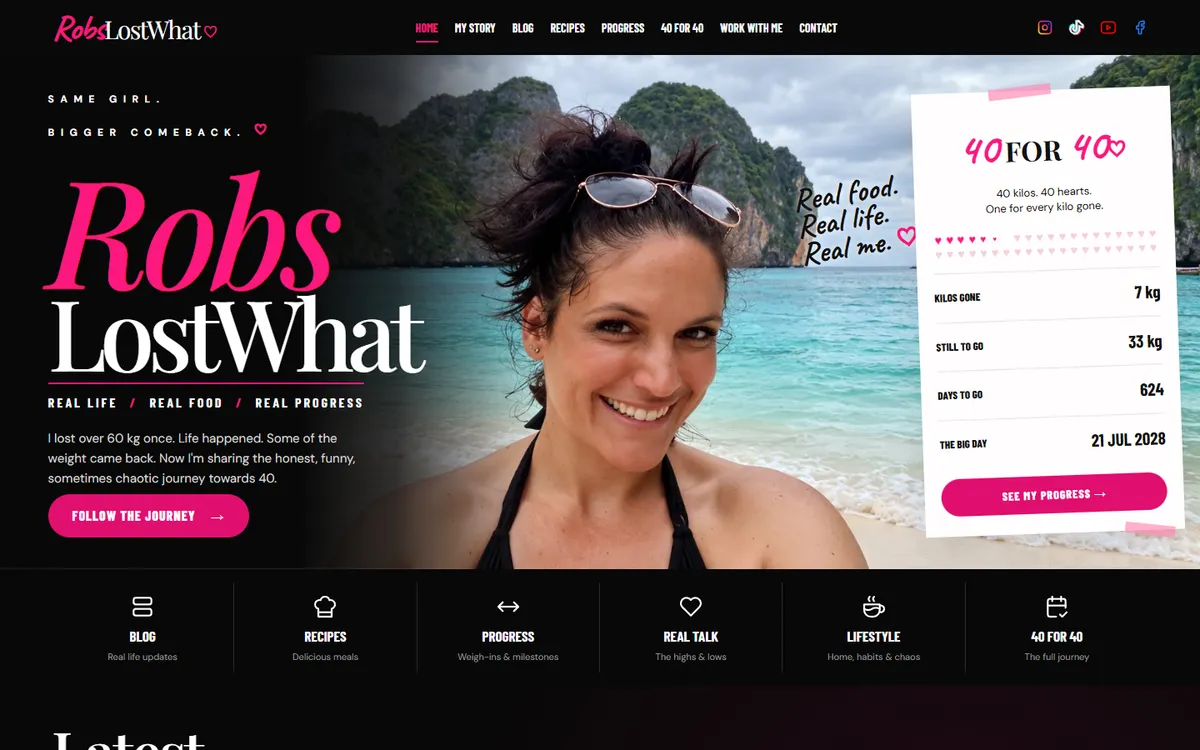
RobsLostWhat is Robs’ personal blog about losing 40 kg before turning 40. The site’s own introduction says it plainly: “I lost over 60 kg once. Life happened. Some of the weight came back.” The blog follows the second attempt, with honest posts, recipes that are meant to be cooked, and every weigh-in in one place, counting down to 21 July 2028.
The domain had been home to a WordPress shop that was no longer used. It was replaced with a custom built site, and the new RobsLostWhat went live at robslostwhat.co.za on 3 November 2026.
In the interest of full disclosure: this is not a client project. Robs is part of the JWD team and Shane’s wife, designed and built the site, and owns it. We are including it because it shows how we build, measured on a live site anyone can check.
The brief: a person, not a programme
The people reading fall into two groups. Some already know Robs, friends, family and social followers keeping up with the journey. The rest are strangers on a similar road, people trying to lose weight who want honesty and food they can make on a weeknight, not a plan to buy. Most of both groups arrive on a phone, often from a social media link, with a few spare minutes.
The brief was just as clear about what the site must not look like: not a diet company with clinical green and white and calorie shaming, not polished influencer content selling a programme, not a stock blog theme, and not aggressive gym branding with before and after shock photos.
What it should feel like is a friend who tells you the truth and makes you laugh about it. That became five working rules for the build:
- Honest over polished. Real numbers, real photos, and empty sections that say “not yet” rather than filler.
- A person, not a brand. First person copy and handwritten asides carry the voice.
- Food good enough to cook. Recipes get generous photos and are easy to follow on a phone.
- Encouraging, never shaming. Distance travelled is shown as prominently as distance to go.
- Robs runs it alone. Every public page is fed from the admin, with no developer needed to post.
Robs’ design, built to the mockup
Robs designed the look first, then built each page against those mockups, round after round, until it matched: a bold pink brush script, black backgrounds, taped polaroid style photos and handwritten notes in the margins. Partway through, the whole site moved from a light version to black, after a dark preview of the home page was compared side by side with the original.
Bold design and accessibility were treated as one job, not a trade off. The target was WCAG 2.2 AA, so the pink was checked for contrast at the sizes it is used, and script fonts are kept for short display phrases, never for paragraphs a person has to read. Google PageSpeed Insights scores the home page 100 for Accessibility on both mobile and desktop.
What the site does
- A blog with categories for the journey, real talk and lifestyle, and cover photos Robs chooses and frames. Photos inside a post sit beside the text, with the words wrapping round them.
- A recipe collection of 21 recipes, searchable, with six filters from chicken dinners and slow cooked favourites to breakfasts and sides. Each recipe shows its time and servings up front, with an estimate of the nutrition per serving.
- A Progress page and a 40 for 40 tracker fed by Robs’ weigh-ins. The home page tracker fills one heart for every kilo gone and counts the days to go. By design, the site shows kilos lost and kilos still to go, never body weight.
- My Story, told in chapters, with a timeline, a gallery and Robs’ before and after photos.
- Work With Me, for brands interested in content, recipe development or campaigns, and a contact page.
- A newsletter sign up on the main pages and every recipe. Sign ups are collected in the admin and exported as a spreadsheet file, ready to move into a mailing service when one is chosen.
An admin built for one person, on a phone
Robs posts from a phone as often as from a computer, so the admin was built around that. One place handles posts and recipes, weigh-ins, the editable pages, settings, newsletter sign ups and contact messages. Photos are uploaded once, and the site makes the smaller copies each screen needs by itself.
A post with no body yet appears on the site as “Coming soon” and is kept out of search engines until it is written, so a planned post never shows up as a thin page in Google.
Fast on a phone, measured
Measured with Google PageSpeed Insights on the live home page on 5 November 2026:
| Mobile | Desktop | |
|---|---|---|
| Performance | 98 | 99 |
| Accessibility | 100 | 100 |
| Best Practices | 100 | 100 |
| SEO | 100 | 100 |
| Largest Contentful Paint | 2.3 s | 0.6 s |
| Total Blocking Time | 0 ms | 0 ms |
| Cumulative Layout Shift | 0.007 | 0.05 |
Lab scores move a few points between runs, so read them as a range rather than an exact figure. The site is too new for Google’s real visitor data, which is collected over 28 days.
The site is plain PHP with no framework or page builder underneath it, which keeps every page light from the start. After launch it was tuned further, and most of the gain came from removing weight:
- The bot check waits until it is needed. The form protection only loads when a form comes near the screen. At the time it made up about 1.9 MB of a 3.2 MB home page.
- Photos at the size the screen needs, in AVIF where the browser supports it and WebP otherwise, with the space for each one reserved so the page does not jump while it loads.
- Fewer, smaller fonts. The two display fonts are now one variable file each: 38 KB instead of 91 KB for one, 75 KB instead of 150 KB for the other. Only the Latin characters the site actually uses are included.
- Styles only where they are used. Two pages with their own layouts carry their own styles, which cut the home page’s stylesheet from 96 KB to 55 KB.
Search engines and AI assistants
- Recipe structured data on every recipe: ingredients, steps, times, servings, cuisine and nutrition, with photos in the three shapes Google’s documentation asks for, and breadcrumbs back to the recipe filters. It makes the recipes eligible for Google’s recipe features, though Google decides when those appear.
- Nothing lost from the old site. Old WordPress addresses such as the shop, about and contact pages now redirect to the nearest new page in one step, and the www and http versions of the domain go straight to the main secure address.
- A sitemap and a simple robots file that welcomes every crawler and keeps them out of the admin.
- An llms.txt file generated from what is live on the site, giving AI assistants a plain summary to read. No AI engine has confirmed that it uses these files, so it is treated as tidy housekeeping rather than a ranking lever.
Built to be looked after
A personal blog still deserves a safe way to update. Every change to the live site goes through one deploy tool that checks the code first, backs up the live files and database, tests the new files on the server before they go live, compares every file’s checksum after upload, and then checks the main pages, the recipe filters and every old address. If anything is wrong, the previous files can be put back in one step. Robs’ own posts, recipes and photos live in the database and are never touched by a deploy.
The result
RobsLostWhat is live at robslostwhat.co.za: Robs’ own design, with a blog, 21 recipes, a weigh-in tracker and a newsletter list, all run from an admin Robs uses without a developer. It is one of the projects on our portfolio.
Considering something similar?
A personal brand, a coach or a creator with a following needs a site that sounds like them and that they can update themselves. If you post often and want your own admin without a stack of plugins to maintain, our guide to static, WordPress or custom CMS websites explains the difference, and the custom CMS business website package is the usual starting point. Request a quote and we can scope it around your content.
Frequently Asked Questions
Can you build a website from my own design?
Yes. RobsLostWhat was built from mockups, page by page, and checked against them until each page matched, and we work the same way from a client’s design. We will flag anything in a design that would fail accessibility or slow the site down, and suggest a fix that keeps the look.
Can I post blogs and recipes myself without a developer?
On a site with an admin, yes. Robs adds posts, recipes, weigh-ins and photos from the admin, often from a phone, and the site resizes photos and updates the home page by itself.
Should a recipe blog use recipe structured data?
If you want search engines to understand your recipes, yes. Recipe structured data describes the ingredients, steps, times and nutrition in a form Google can read, and makes the recipe eligible for Google’s recipe features. Eligibility is not a guarantee: Google decides when to show them.
Can a bold, colourful design still be accessible?
Yes, if contrast is checked rather than guessed. On RobsLostWhat the pink was tested against WCAG AA at the sizes it appears, and script fonts are kept for short phrases. The home page scores 100 for Accessibility in Google PageSpeed Insights on mobile and desktop.
What happens to my old website’s addresses when the new site goes live?
Each old address should redirect to its nearest equivalent on the new site in a single step, so bookmarks and old search results still work. On this project the old shop, about and contact addresses all redirect, and so do the www and http versions of the domain.
How do you keep a weight loss site encouraging rather than shaming?
Choose what the site measures. RobsLostWhat shows kilos lost and kilos still to go, never body weight, and gives the distance already travelled the same prominence as the distance left.
What does a website like this cost?
It depends on how many pages and features it needs and how much of the admin has to be built. Our custom CMS business website package is the starting point, and we quote the exact price once the scope is agreed.